Realistic AI text to speech voice generator
Realistic AI text to speech voice generator
AI voice generation is seamlessly integrated into elevate.io, the online video editor that runs in your browser.
AI voice generation is seamlessly integrated into elevate.io, the online video editor that runs in your browser.
Text to speech
Text to speech
How to add AI voice narration to videos
01
Create a new project
Click the blue Create project button in the top right of your workspace.
02
Upload your video
03
Add AI text to speech
04
Hit Export to get your video
01
Create a new project
Click the blue Create project button in the top right of your workspace.
01
Create a new project
Click the blue Create project button in the top right of your workspace.
Editing tips
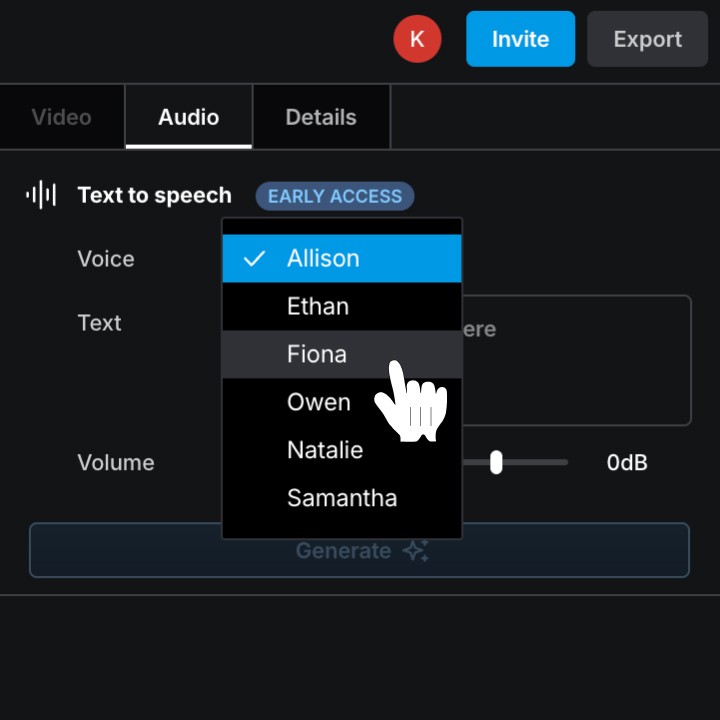
Freely change voices
In the Inspector panel on the right, click next to Voice to open the dropdown menu and select a voice that fits the vibe of your video.

Keep editing
AI voice generation happens seamlessly in the cloud, you can keep editing without any interruptions.
Freely change voices
In the Inspector panel on the right, click next to Voice to open the dropdown menu and select a voice that fits the vibe of your video.
Keep editing
AI voice generation happens seamlessly in the cloud, you can keep editing without any interruptions.
Freely change voices
In the Inspector panel on the right, click next to Voice to open the dropdown menu and select a voice that fits the vibe of your video.
Keep editing
AI voice generation happens seamlessly in the cloud, you can keep editing without any interruptions.
Freely change voices
In the Inspector panel on the right, click next to Voice to open the dropdown menu and select a voice that fits the vibe of your video.
Keep editing
AI voice generation happens seamlessly in the cloud, you can keep editing without any interruptions.
Freely change voices
In the Inspector panel on the right, click next to Voice to open the dropdown menu and select a voice that fits the vibe of your video.
Keep editing
AI voice generation happens seamlessly in the cloud, you can keep editing without any interruptions.
Freely change voices
In the Inspector panel on the right, click next to Voice to open the dropdown menu and select a voice that fits the vibe of your video.
Keep editing
AI voice generation happens seamlessly in the cloud, you can keep editing without any interruptions.
Freely change voices
In the Inspector panel on the right, click next to Voice to open the dropdown menu and select a voice that fits the vibe of your video.
Keep editing
AI voice generation happens seamlessly in the cloud, you can keep editing without any interruptions.
Freely change voices
In the Inspector panel on the right, click next to Voice to open the dropdown menu and select a voice that fits the vibe of your video.
Keep editing
AI voice generation happens seamlessly in the cloud, you can keep editing without any interruptions.
Freely change voices
In the Inspector panel on the right, click next to Voice to open the dropdown menu and select a voice that fits the vibe of your video.
Keep editing
AI voice generation happens seamlessly in the cloud, you can keep editing without any interruptions.
Freely change voices
In the Inspector panel on the right, click next to Voice to open the dropdown menu and select a voice that fits the vibe of your video.
Keep editing
AI voice generation happens seamlessly in the cloud, you can keep editing without any interruptions.
Freely change voices
In the Inspector panel on the right, click next to Voice to open the dropdown menu and select a voice that fits the vibe of your video.
Keep editing
AI voice generation happens seamlessly in the cloud, you can keep editing without any interruptions.
Freely change voices
In the Inspector panel on the right, click next to Voice to open the dropdown menu and select a voice that fits the vibe of your video.
Keep editing
AI voice generation happens seamlessly in the cloud, you can keep editing without any interruptions.
FAQ
Can I use AI text to speech on the free Starter plan?
elevate.io has a free Starter plan that includes 100 free introductory tokens for AI tools like AI text to speech.
Do I need to download or install anything?
No, elevate.io is a fully online video editor that runs in your browser. You can edit videos and use AI voice generation without downloading any software.
How much AI text to speech can I use?
Using AI generators like AI text to speech in elevate.io costs tokens. Get monthly tokens and purchase more when you run out by subscribing to the Creator plan.